Team Tekno World ke free mobile repairing course mein aapka swagat hai! Main hoon Rakesh Chauhan, aur yeh humara Lesson 43 hai.
Aaj se humara Course Phase 2: Software shuru ho raha hai! 🥳
Ab tak humne board par kaam kiya (Hardware), ab hum computer par kaam karenge (Software).
Naye technicians ke dimaag mein sabse bada sawaal yahi hota hai:
⚠️ Important Disclaimer
This guide is for educational and diagnostic purposes only.
Iska use sirf device connection, firmware flashing aur software troubleshooting ke liye karein.
Hum kisi bhi illegal modification ya security bypass ko promote nahi karte.
Best Mobile Software Tools 2026
“Sir, Software ke liye kaunsa Box khareedun? UMT loon, Unlock Tool loon, ya UFI loon?”
Market mein itne tools hain ki banda confuse hokar galat cheez khareed leta hai. Aaj hum Best Mobile Software Tools ka poora breakdown karenge aur aapko batayenge ki 2026 mein aapke paise kahan lagne chahiye.
Step 1: Software Repairing Mein Hum Karte Kya Hain?
Tools kharidne se pehle kaam samjhein. Software mein hum 2 main kaam karte hain:
- Flashing (OS Installation):
- Jaise Laptop mein Windows dalte hain, waise mobile mein Flash File dalte hain.
- Use: Dead phone, Hang on Logo, Restart problem theek karne ke liye.
- Unlocking (FRP & Pattern Reset)):
- Pattern Lock, Pin, Password, FRP (Google Account), aur Mi Cloud hatana.
- Isme data bachane ki koshish ki jaati hai (Safe Format).
Step 2: Dongle vs Digital License (Samajhna Zaroori Hai)
Pehle har tool ka ek USB Pendrive (Dongle) aata tha. Lekin 2026 mein trend badal gaya hai.
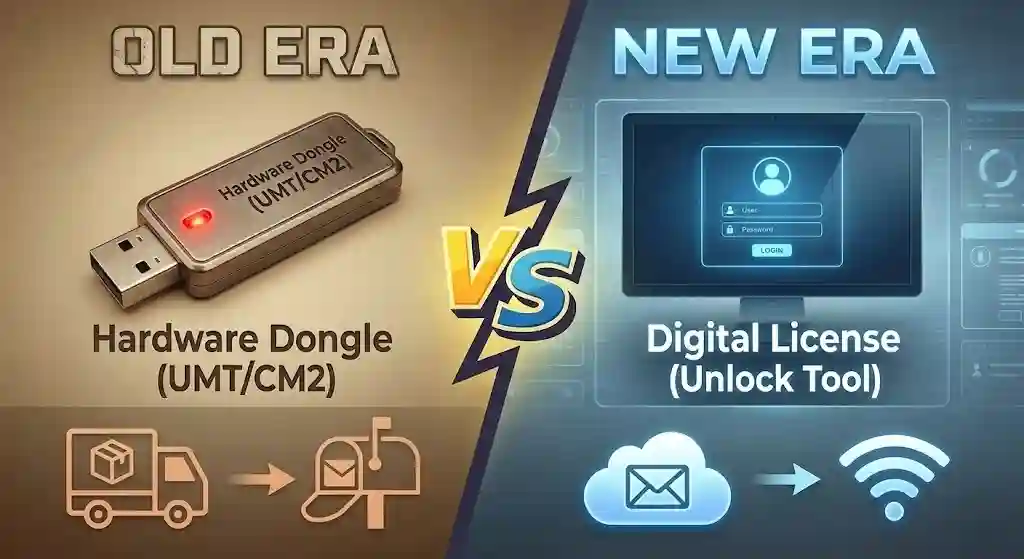
- Hardware Dongles (The Old Kings):
- Yeh ek USB Key hoti hai. Jab tak computer mein lagi rahegi, software chalega.
- Example: UMT, CM2, Hydra, Miracle (Ab Dead hai).
- Fayda: Ek baar lo, saalo chalao (Bas yearly recharge lagta hai).
- Digital Licenses (The New Trend):
- Isme koi Dongle nahi chahiye. Bas website par ID/Password khareedo, Login karo aur chalao.
- Example: Unlock Tool, Chimera, DFT Pro.
- Fayda: Kahin bhi use karo, Dongle khone ka darr nahi. Fast updates aate hain.
Step 3: Beginner Ke Liye Kaunsa Tool Best Hai? (My Recommendation)
Agar aap nayi dukaan khol rahe hain, toh shuruat mein lakho rupaye kharch karne ki galti na karein. Yeh raha mera Budget Setup:
1. Unlock Tool (Must Have – Primary Tool) 👑
Agar aaj aapke paas Unlock Tool nahi hai, toh aap software market mein survive nahi kar sakte.
- Type: Digital License (3 Months / 6 Months / 1 Year).
- Power: Xiaomi, Oppo, Vivo, Realme, Samsung ka FRP/Pattern ek click mein hatata hai. Iske updates sabse fast hain.
- Verdict: Aankh band karke sabse pehle yahi le.
2. UMT Pro (Ultimate Multi Tool) 🛠️
- Type: Hardware Dongle.
- Power: Qualcomm CPU wale phones (jo Unlock tool se fail ho jayein) unke liye UMT Brahmastra hai. Yeh Baseband Repair aur Network fix mein bhi kaam aata hai.
- Verdict: Isey backup ke liye zaroor rakhe.
3. UFI Box / EasyJTAG (Wait for Now) 📦
- Ruko! Abhi isey mat khareedna.
- Yeh eMMC/UFS Programming (Chip Level Data Recovery) ke liye hain. Inki keemat ₹25,000+ hoti hai. Jab aap Flashing mein expert ban jayein, tab ispar aana.
Step 4: Laptop/PC Requirements (Dabba Nahi Chalega)
Software tools bhaari hote hain. Agar PC slow hoga, toh flashing ke beech mein ruk jayega aur phone Dead ho jayega.
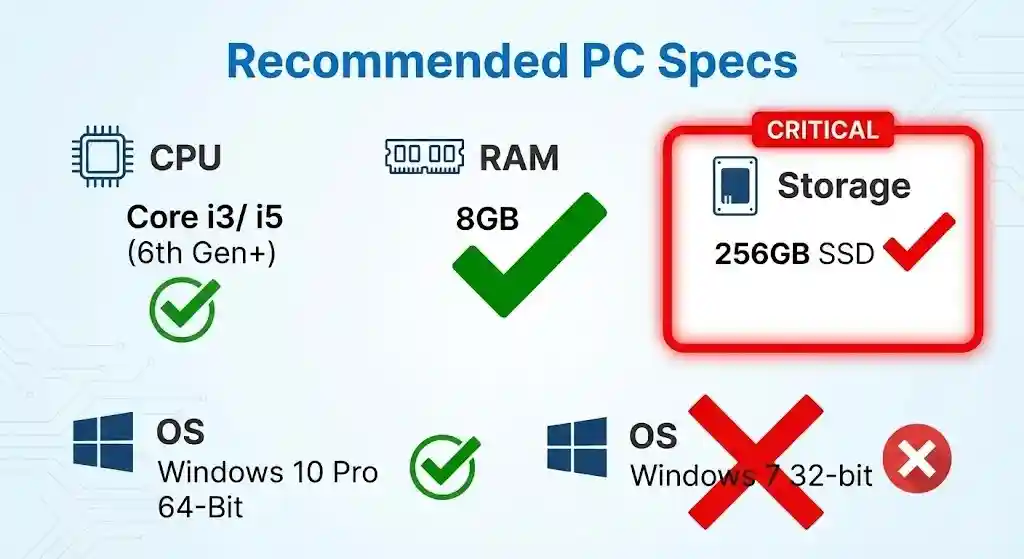
- Operating System:Windows 10 Pro (64-Bit) Compulsory hai.
- ❌ Windows 7 (Drivers support nahi karte).
- ❌ 32-Bit Windows (Naye tools install nahi honge).
- Processor: Intel i3 (6th Gen) ya i5. AMD Ryzen 3/5 bhi chalega.
- RAM: Minimum 4GB, Recommended 8GB.
- Storage (Most Important): Hard Disk (HDD) ki jagah SSD lagwayein. SSD aapke kaam ki speed 10 guna badha degi.
Summary Checklist (Shopping List)
- Computer: Windows 10 (64-bit) + SSD wala PC ready kare.
- Purchase: Sabse pehle Unlock Tool ka 3 ya 6 ya 12 mahine ka license le.
- Cable: Achhi quality ki Data Cables (Type-C & Micro USB) rakhein.
- Internet: High-speed internet (WiFi) zaroori hai files download karne ke liye.
💡 Aaj Ka Aapka Task – Lesson 43 (Comments & Forum)
- Check PC: Apne Computer par
This PCpar right click karkePropertiesmein dekhein. Kya wahan “64-bit Operating System” likha hai? - Comment (नीचे): Kya aapne kabhi “Koi Free Tool use kiya hai?
- Forum: Unlock Tool ka price daily up-down hota hai. Aaj ka rate janne ke liye Forum (forum.teamtw.in) check karein.
Agla Lesson: Tool toh le liya, lekin wo PC se baat kaise karega? Bina Drivers ke Computer mobile ko pehchanega hi nahi. Agla Lesson hai: “Lesson 44: Mobile Drivers Master Class (ADB, Fastboot, Qualcomm, MTK & SPD Drivers Setup)”।