
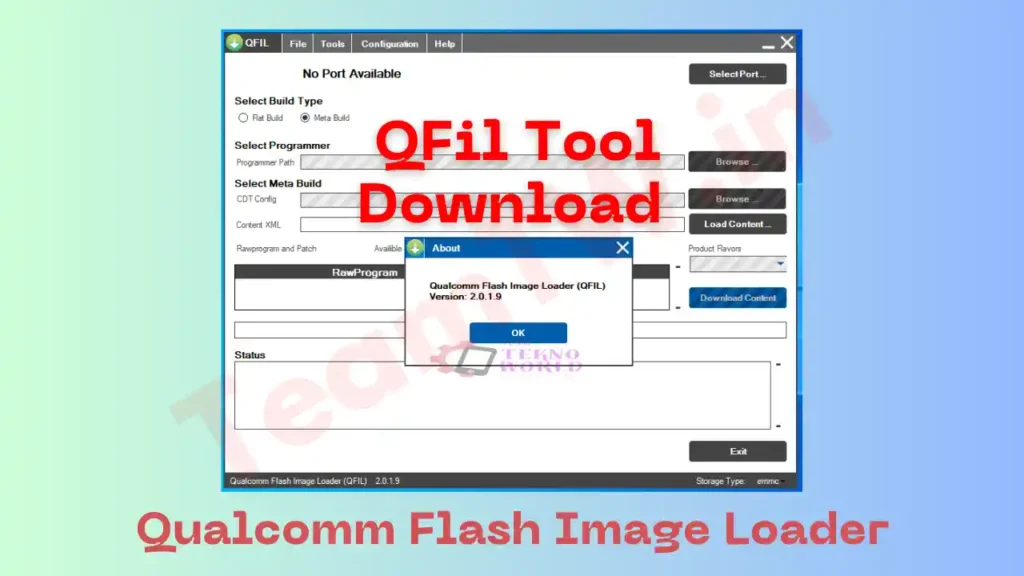
Agar aap Qualcomm chipset wale Android phone ko flash, unbrick ya software repair karna chahte ho, to QFIL Tool aapke liye ek must-have utility hai. QFIL (Qualcomm Flash Image Loader) ek official Windows-based flashing software hai jo Qualcomm devices par stock firmware install karne ke kaam aata hai. Is master guide me hum QFIL Tool download, installation, usage, features, errors aur troubleshooting sab kuch step-by-step Hinglish me cover karenge, bilkul us style me jaise ek senior technician apne junior ko samjhata hai.
Chahe aap beginner ho ya already mobile repairing field me ho, ye guide aapko safe, practical aur professional approach dega.
⚠️ Important Disclaimer
This guide is for educational and diagnostic purposes only.
Iska use sirf device connection, firmware flashing aur software troubleshooting ke liye karein.
Hum kisi bhi illegal modification ya security bypass ko promote nahi karte.
What is QFIL Tool? (Qualcomm Flash Image Loader)
QFIL Qualcomm Technologies ke dwara develop kiya gaya ek official flash utility hai, jo QPST (Qualcomm Product Support Tools) suite ka part hota hai. Iska main use hota hai:
- Qualcomm devices par stock firmware flashing
- Dead / bricked phone ko revive karna
- Software corruption ya bootloop issues fix karna
QFIL specially EDL Mode (9008) par kaam karta hai, jo Qualcomm devices ka low-level emergency mode hota hai.
Key Features
🔹 1. Unbrick Qualcomm Devices
Agar phone logo par atak gaya hai, boot nahi ho raha ya completely dead hai, to QFIL se use revive kiya ja sakta hai.
🔹 2. Flash Stock Firmware
Official firmware flashing ke liye best tool hai – upgrade, downgrade ya clean install sab possible hai.
🔹 3. Flat Build & Meta Build Support
QFIL me aap Flat Build (rawprogram.xml) ya Meta Build ke through flashing kar sakte ho.
🔹 4. Real-Time Log Box
Flashing ke dauran saari activity log box me show hoti hai, jisse error identify karna easy hota hai.
🔹 5. Built-in Loader Package
Kai cases me external loader file ki zarurat nahi padti, kyunki QFIL ke paas built-in loaders hote hain.
🔹 6. Wide Qualcomm Chipset Support
Snapdragon series ke almost sabhi Qualcomm CPUs supported hote hain.
System Requirements (Before Download)
- OS: Windows 7 / 8 / 10 / 11 (32-bit & 64-bit)
- Qualcomm USB Driver installed
- Minimum 2 GB RAM
- Stable USB cable & PC/Laptop
Download Area – QFil Tool Download
| Detail | Info |
|---|---|
| File Name | QPST Tool |
| Version | Latest |
| OS Support | Windows 7 / 8 / 10 / 11 (32 & 64 bit) |
| Use Case | Flashing, Firmware Install, Device Detection |
⚠️ Note: Galat driver flashing se device detect nahi hoga. Carefully use karein.
Note: QFIL, QPST ka hi ek part hota hai. Dono same nahi hain, lekin QFIL QPST ke andar included hota hai.
How to Install On Windows (Step-by-Step)
Step 1: Download Zip File
Trusted source se QPST file download kare.
Step 2: Extract the File
Right-click → Extract Here / Extract to Folder.
Step 3: Run QFIL.exe
QFIL Tool portable hota hai, isliye installation ki zarurat nahi hoti. Direct QFIL.exe run kare.
Step 4: Install Qualcomm USB Driver
Phone detect hone ke liye driver install hona mandatory hai.
How to Use QFIL Tool for Flashing (Beginner Friendly)
Step 1: Device ko EDL Mode me le aaye
- Test Point method
- Volume key combination
- Dead phone auto-EDL
Step 2: Phone ko PC se Connect karein
Device Manager me Qualcomm HS-USB QDLoader 9008 show hona chahiye.
Step 3: Launch QFIL Tool
Select Flat Build option.
Step 4: Firmware Load karein
- Programmer path select karein (prog_emmc_firehose.mbn)
rawprogram.xml&patch.xmlload karein
Step 5: Flash Button Click karein
Process complete hone tak wait karein. “Download Succeed” message aane par phone reboot karein.
Common QFIL Errors & Troubleshooting
❌ Sahara Fail Error
✔ Correct programmer file use karein
✔ Firmware same model ka ho
❌ No Port Available
✔ Qualcomm USB Driver reinstall karein
✔ USB cable / port change karein
❌ Download Fail
✔ Antivirus temporarily disable karein
✔ Windows 64-bit compatibility check karein
Conclusion
Agar aap mobile repairing field me ho ya Qualcomm phone software issue face kar rahe ho, to QFIL Tool aapke toolkit ka sabse powerful weapon hai. Proper knowledge, correct firmware aur sahi steps follow karke aap dead Qualcomm phones ko bhi zinda kar sakte ho.
Practice ke saath-saath aap QFIL Tool me expert ban sakte ho. Hamesha yaad rakho – flashing me patience aur accuracy sabse important hoti hai.
Related Guides
- Qualcomm USB Driver Download Guide
- EDL Mode Test Point Method
- Stock ROM Flashing Basics
Frequently Asked Questions (FAQ)
Q1. Is QFIL Tool free hai?
Haan, ye Qualcomm ka official aur completely free tool hai.
Q2. QFIL aur QPST same hai?
Nahi. QFIL, QPST suite ka ek part hai.
Q3. Kya Ye Tool safe hai?
Haan, jab aap correct firmware aur process follow karte ho.
Q4. Kaunse CPUs supported hain?
Sirf Qualcomm chipset based devices.
Q5. Qualcomm firmware kahan milega?
Official brand website, service firmware portals ya trusted mobile repair forums par.
Credits & Disclaimer
This guide is for educational and professional use only. Flashing firmware may void warranty or cause data loss. Team Tekno World is not responsible for any damage caused due to incorrect flashing.
Article compiled, optimized & presented by Rakesh Chauhan – Team Tekno World

Pingback: A Guide to SPD USB Driver Install – Free Spreadtrum Driver Download -