
Agar aap SPD USB Driver ke baare me clear, practical aur real-world mobile repairing knowledge chahte ho, to yeh master guide aapke liye perfect hai. Ye Driver Spreadtrum (UNISOC) chipset based Android smartphones aur tablets ke liye ek core utility hai, jiske bina na phone PC se sahi connect hota hai aur na hi flashing, Network repair ya firmware update possible hota hai.
Mobile repairing field me kaam karne wale technicians ke liye Ye Driver bilkul “entry gate” jaisa hota hai. Chahe aap SPD Flash Tool, Research Download Tool, ya professional boxes jaise Miracle, UMT, Infinity, Volcano use kar rahe ho — sabse pehle correct driver install hona zaroori hai. Is guide me hum SPD USB Driver kya hai, features, download, auto & manual installation, use-cases, common errors aur unke fixes ko senior-technician style me samjhenge.
⚠️ Important Disclaimer
This guide is for educational and diagnostic purposes only.
Iska use sirf device connection, firmware flashing aur software troubleshooting ke liye karein.
Hum kisi bhi illegal modification ya security bypass ko promote nahi karte.
📌 SPD USB Driver Kya Hai?
SPD USB Driver (jise Spreadtrum ya UNISOC USB Driver bhi kaha jata hai) ek software bridge hai jo SPD chipset powered Android devices aur Windows computer ke beech communication establish karta hai. Jab aap phone ko USB cable ke through PC se connect karte ho, to Windows ko phone ke hardware ko samajhne ke liye driver chahiye hota hai — wahi kaam USB Driver karta hai.
Simple words me:
Driver install nahi hoga = PC phone ko detect hi nahi karega.
Isliye flashing, data transfer, charging detection, Network repair, ya FRP unlock jaise kaam SPD driver ke bina possible nahi hote.
🔍 SPD USB Driver Kyun Important Hai?
Ye Driver sirf ek normal connectivity tool nahi hai. Ye driver multiple technical operations enable karta hai, jaise:
- Phone ko PC me properly detect karna
- SPD Flash Tool / Research Download Tool me device recognize karna
- Firmware flashing & software upgrade
- Network repair & diagnostic tasks
- Professional boxes ke saath stable communication
Agar driver missing ya corrupt ho, to:
- Device “Unknown Device” show karega
- Flashing tools error denge
- Network tools phone detect nahi karenge
✨Key Features
Is USB Driver ko powerful banane wali kuch important features:
- ✔ One-click auto installer support
- ✔ Manual installation option available
- ✔ All Spreadtrum / UNISOC chipset support
- ✔ Windows XP se Windows 11 tak compatible
- ✔ 32-bit & 64-bit systems supported
- ✔ Flashing, Network repair & unlock tools ke liye optimized
Ye features Is USB Driver ko beginners aur professional technicians dono ke liye reliable banate hain.
⚙️ Main Use-Cases
🔹 1. Normal Phone Connection
- Phone ko PC se connect karna
- Charging & MTP (file transfer) support
🔹 2. Firmware Flashing
- Dead phone / bootloop fix
- SPD Flash Tool & Research Download Tool support
🔹 3. Baseband Repair & Unlocking
- SPD Write Tool compatibility
🔹 4. Professional Box Support
SPD USB Driver following tools ke saath kaam karta hai:
- Miracle Box
- UMT SPD
- Infinity Box
- Volcano Box
- GSM Aladdin
- MRT Dongle
💻 System Requirements & Compatibility
Supported Operating Systems:
- Windows XP
- Windows 7
- Windows 8 / 8.1
- Windows 10
- Windows 11
System Architecture:
- 32-bit (x86)
- 64-bit (x64)
⚠️ Note: Windows 8/10/11 users ko kabhi-kabhi Driver Signature Enforcement disable karna padta hai.
🛠️ How to Install SPD USB Driver (Auto Method)
🔹 Step 1: Driver Download
- SPD Driver download kare
🔹 Step 2: Extract & Run
- ZIP/RAR file extract kare
- Extracted folder me DriverSetup.exe run kare
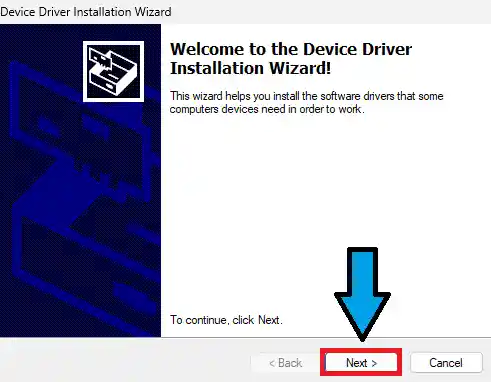
- Installer open hone par Device Driver Installation Wizard aayega. Yahan Next par click kare.
🔹 Step 3: Installation Complete
- Jab saare drivers ke aage Green Check Marks (Ready to use) aa jayein, to Finish button dabaye
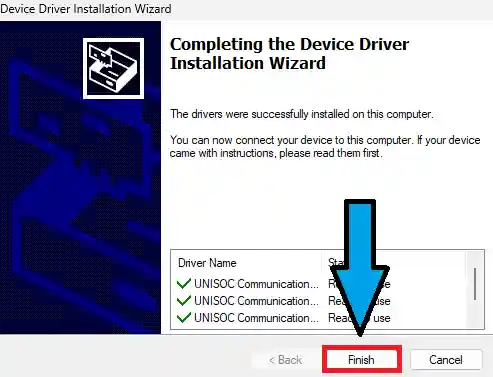
- Setup complete hone ke baad PC restart kare
- Restart ke baad phone connect kare
👉 Ye method beginners ke liye sabse easy hai.
🧰 Manual Installation (Advanced Method)
Agar auto installer kaam na kare, to manual installation follow karein:
- Manual SPD driver package download kare
- Files extract kare
- Device Manager open kare
- Action → Add legacy hardware
- “Install hardware manually” select kare
- .inf file browse karke select kare
- Installation complete hone ke baad restart kare
❗ Common Problems & Troubleshooting
❌ SPD Device Detect Nahi Ho Raha
Possible Reasons:
- Wrong driver version
- USB cable / port issue
- Signature enforcement enabled
Fix:
- Driver reinstall karein
- Different USB port use karein
- Signature enforcement disable kare
❌ Driver Signature Error
Solution:
- CMD ko Administrator mode me open karein
- Command run karein:
bcdedit /set testsigning on - PC restart karein
- Driver install karein
📥 Download Area
USB Driver ke commonly used packages:
- SPD USB Driver R4.20.0201
- SPD Auto Installer
| Detail | Info |
|---|---|
| File Name | SPD USB Driver |
| Version | Latest |
| OS Support | Windows 7 / 8 / 10 / 11 (32 & 64 bit) |
| Use Case | Flashing, Firmware Install, Device Detection |
⚠️ Note: Galat driver flashing se device detect nahi hoga. Carefully use karein.
👉 Hamesha trusted technical website se hi driver download karein, kyunki modified drivers system aur device dono ke liye risky ho sakte hain.
✅ Conclusion
Spreadtrum USB Driver Spreadtrum / UNISOC devices ke liye ek mandatory utility hai. Chahe aap mobile repairing seekh rahe ho ya already technician ho, bina sahi driver ke na flashing possible hai, na Network repair, aur na hi professional tools ka use. Is guide ko properly follow karne se aap 90% SPD related detection problems easily solve kar sakte ho.
🔗 Related Guides
- SPD Flash Tool – Complete Guide
- How to Flash PAC Firmware on SPD Phones
- Mobile Repairing Course (Beginner to Advanced)
Frequently Asked Questions (FAQ)
Kya SPD USB Driver free hai?
Haan, ye driver completely free hai.
Kya ye UNISOC phones ko support karta hai?
Haan, Spreadtrum / UNISOC chipset wale sabhi Android devices supported hain.
Kya ye sirf flashing ke liye hai?
Nahi, ye Network repair, unlocking aur normal connection ke liye bhi use hota hai.
Kya Windows 11 me kaam karta hai?
Haan, lekin signature enforcement disable karna pad sakta hai.
📌 Credits & Disclaimer
SPD Driver Download UNISOC (formerly Spreadtrum Communications, Inc.) dwara develop kiya gaya hai.
Ye article sirf educational aur technical guidance purpose ke liye publish kiya gaya hai.
Article compiled, optimized & presented by Rakesh Chauhan – Team Tekno World

Pingback: SPD Upgrade Tool Download & Reliable Tool For Unisoc CPU -
Pingback: How To Use SPD Research Tool And Download Free -